How to Build an AI-Powered Chat Application?
Building an AI-Powered Chat Application today isn’t just a cool tech experiment—it’s quickly becoming a business necessity. From customer support bots to AI companions and productivity assistants, chat apps powered by artificial intelligence are redefining how people interact with software.
But here’s the thing: most guides make it sound either too easy (“just plug in an API”) or overly complex (“build your own model from scratch”). The truth lies somewhere in between.
In this guide, I’ll walk you through how to actually build an AI-Powered Chat Application—from idea to deployment—without fluff. I’ll also share practical insights, mistakes to avoid, and real-world considerations that often get ignored.
What Is an AI-Powered Chat Application?
An AI-Powered Chat Application is a messaging platform that uses artificial intelligence—typically natural language processing (NLP) and machine learning—to understand and respond to user input in a human-like way.
Unlike traditional chat systems, these apps don’t rely on fixed scripts. They can:
- Understand context
- Generate dynamic responses
- Learn from interactions
- Personalize conversations
Step 1: Define Your Use Case
Before writing a single line of code, get brutally clear about why you're building this.
Not all AI chat apps are the same.
Common use cases:
- Customer support chatbot
- AI companion or roleplay chat
- Productivity assistant
- E-commerce recommendation bot
- Internal team assistant
Insight: If your use case is vague, your product will feel generic. The best AI chat apps feel like they were built for one specific purpose—even if they expand later.
Step 2: Choose the Right Tech Stack
Your tech stack determines how fast you build and how scalable your app becomes.
Frontend
- React.js
- Next.js
- Flutter
Backend
- Node.js
- Python
Database
- MongoDB
- PostgreSQL
AI Integration
- OpenAI API / LLM providers
- Hugging Face models
- Custom-trained models
Tip: Start simple. You don’t need a custom AI model on day one. Use APIs first, then optimize later.
Step 3: Design the Conversation Flow
This is where many developers fail.
Even though AI generates responses dynamically, you still need to guide the experience.
Think about:
- Tone (formal, casual, flirty, professional)
- Personality (assistant, friend, expert)
- Response length
- Memory (does it remember past chats?)
Example:
A customer support bot should be:
- Clear
- Short
- Helpful
An AI companion should be:
- Emotional
- Adaptive
- Engaging
Insight: AI is powerful, but without personality design, it feels empty.
Step 4: Integrate the AI Model
Now comes the core part of your AI-Powered Chat Application.
Basic flow:
- User sends a message
- Backend processes it
- AI model generates a response
- Response is sent back to the user
Example (simplified):
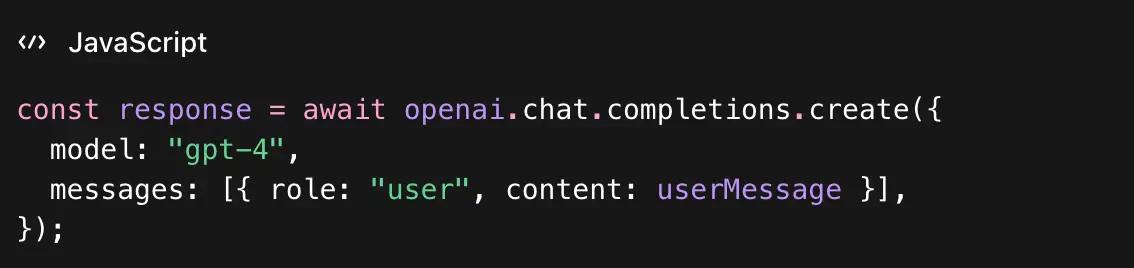
Important considerations:
- Prompt engineering: How you frame input matters
- Temperature control: Adjust creativity vs accuracy
- Token limits: Manage conversation length
Pro tip: Your app’s quality depends more on prompt design than raw AI power.
Step 5: Add Memory & Context Handling
This is what separates a basic chatbot from a real AI chat app.
Without memory, every message feels like the first conversation.
Options:
- Store chat history in a database
- Use session-based memory
- Summarize past conversations
Example features:
- “Remember my name”
- Context-aware replies
- Long conversation continuity
Insight: Users don’t want to repeat themselves. Memory = better engagement.
Step 6: Build a Smooth Chat UI
A great AI-Powered Chat Application isn’t just smart—it feels smooth.
Key UI elements:
- Typing indicator
- Message bubbles
- Auto-scroll
- Fast response time
- Mobile-friendly design
Optional enhancements:
- Voice input/output
- Emoji reactions
- Avatar or 3D character
Opinion: UI matters more than people think. A slightly less intelligent bot with a great UI often feels better than a powerful AI with clunky design.
Read More Blog: Real-World React Native Success Stories: Apps Built with React Native
Step 7: Implement Safety & Moderation
AI can sometimes generate unexpected or unsafe responses.
You must add guardrails.
Safety measures:
- Content filtering
- Moderation APIs
- Prompt restrictions
- User reporting system
Why this matters:
- Protect users
- Avoid legal issues
- Maintain brand trust
Real talk: Ignoring safety is one of the fastest ways to kill your app.
Step 8: Optimize Performance & Cost
AI APIs can get expensive fast.
Ways to optimize:
- Limit token usage
- Cache common responses
- Use smaller models when possible
- Batch requests
Example:
Instead of sending full chat history every time:
- Summarize previous messages
- Send only relevant context
Insight: Scaling an AI-Powered Chat Application isn’t just technical—it’s financial.
Step 9: Add Personalization Features
This is where your app becomes addictive.
Ideas:
- Custom AI personalities
- User preferences
- Mood-based responses
- Relationship roles
Example:
Instead of generic replies:
“Hello, how can I help?”
Make it:
“Hey! Good to see you again. What’s on your mind today?”
Why it works: People connect with personality, not just functionality.
Step 10: Test with Real Users
Don’t wait until everything is perfect.
Test for:
- Response quality
- Speed
- Bugs
- User satisfaction
Ask users:
- Does it feel natural?
- Is it helpful?
- Would you use it again?
Insight: Users will notice issues you never thought of.
Step 11: Deploy & Scale
Once ready, deploy your AI-Powered Chat Application.
Deployment options:
- AWS
- Vercel
- Firebase
- DigitalOcean
Scaling tips:
- Use load balancing
- Optimize API calls
- Monitor usage
Pro tip: Start with a small audience. Scale gradually.
Common Mistakes to Avoid
Let’s save you some pain.
1. Overcomplicating the first version
Start simple. Launch fast.
2. Ignoring UX
Even great AI fails with poor design.
3. No clear use case
Generic apps rarely succeed.
4. No cost control
AI usage can explode your budget.
5. Skipping feedback
Users shape your product, not assumptions.
Final Thoughts
Building an AI-Powered Chat Application is one of the most exciting opportunities right now. But success doesn’t come from just plugging into an AI API—it comes from thoughtful design, strong UX, and a clear purpose.
Start small. Focus on one problem. Make the experience feel human.
Because at the end of the day, people don’t just want smart apps—they want something that understands them.

Mohit Kinger writes about blogs and e-books on enormous and in-trend technologies for 4waytechnologies from the past two years. Before hopping into technical content writing, he got a graduate degree in Bachelor’s of Technology, which helps him to approach various blogs based on cutting-edge technologies efficiently.